Materials
Which part of an object a query found, and a table of your own indexed by it: the armadillo with a
cylinder bored through its chest. The source is at Examples/Materials/main.cpp.
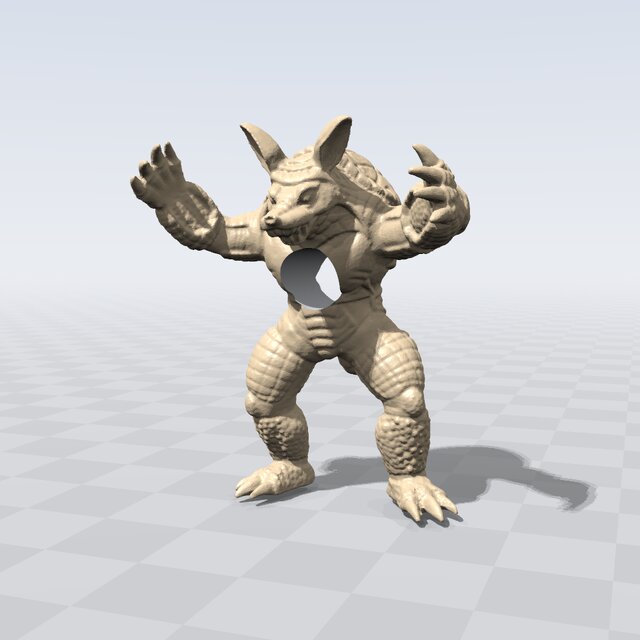
Fig. 27 The armadillo colored by leaf, from a table of its own: the skin sand, the bore’s wall (the cylinder’s) steel gray.
Important
The default mesh comes from the common-3d-test-models git submodule. Clone with
--recurse-submodules, or run git submodule update --init in the repository (see
Obtaining EBGeometry); otherwise pass a mesh of your own as the first argument.
The leaf id
A tape numbers its leaves in expression order: in Difference(armadillo, bore) the armadillo is leaf 0
and the cylinder leaf 1. The number indexes a table of your own (material names here; in an application,
materials or boundary conditions). Two queries report it:
closestPrimitive(p).m_leaf, the leaf the value atpcomes from (see Which part: the deciding primitive);firstHit(shape, ray, tMin, tMax).m_primitive, the leaf the ray crossed, with the point and the normal (see Ray queries).
const char* materials[] = {"skin (the armadillo)", "machined (the cylinder's bore)"};

const auto hit = firstHit(tape, ray, T(0), T(6));

if (hit.m_status == HitStatus::Hit && hit.m_primitive < 2) {
  std::cout << materials[hit.m_primitive] << '\n';
}
A query can name no leaf (PrimitiveRef::None), so check the number before indexing. A mesh is one
leaf; its faces are told apart by getClosestFace() on the mesh itself (see
MeshSDF).
The program prints the value and material at three points, and what three rays hit: the chest from in front, nothing straight through the bore, and the bore’s wall sideways from inside it.
Looking at it
Settings::m_colorBy = ColorBy::Primitive colors each surface by the same HitT::m_primitive.
Settings::m_primitiveColors gives each leaf a color of its own, indexed like the material table (a
leaf left out gets the renderer’s palette), and the camera looks from low in front, where the bore shows:
Render::Settings<T> settings;
settings.m_colorBy            = Render::ColorBy::Primitive;
settings.m_primitiveColors[0] = Vec3(0.78, 0.62, 0.42); // the skin, sand
settings.m_primitiveColors[1] = Vec3(0.55, 0.57, 0.60); // the bore, steel gray

Render::view(tape, pool, camera, settings, argc, argv);
The window needs SDL2 and is built with make VIEWER=SDL2 or cmake -DEBGEOMETRY_VIEWER=SDL2 (see
The viewer window (EBGEOMETRY_VIEWER)); otherwise, and with --no-view or without a display, view() prints why
and returns. Drag to orbit and scroll to zoom; the window lists its other keys (see
The viewer’s keys).
Building and running
See Building for how to compile it with CMake, GNU Make, or a direct compiler invocation. Built for a GPU (see Running on a GPU), the window renders on the device.
cd Examples/Materials
./Materials.ex