Surface labels
Which part of an object a query found, by label, and a table of your own indexed by it: the armadillo
with a cylinder bored through its chest, standing in a ring of pebbles. The source is at
Examples/SurfaceLabels/main.cpp.
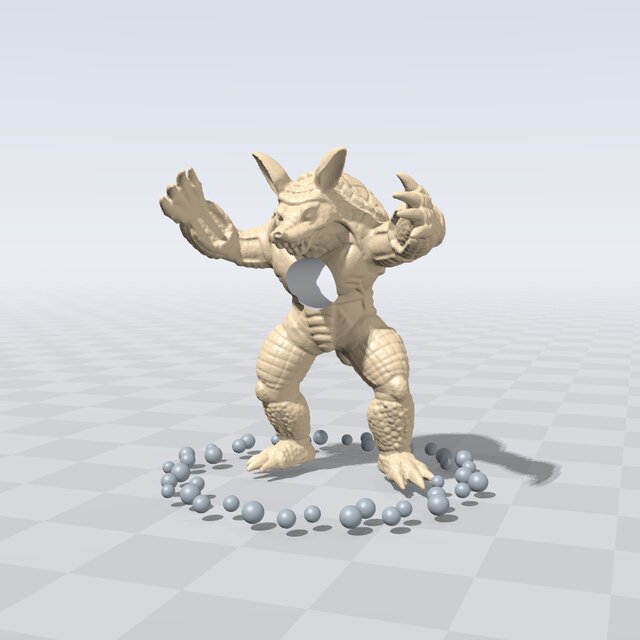
Fig. 34 The armadillo colored by leaf, from a table of its own: the skin sand, the bore’s wall (the cylinder’s) steel gray, the pebbles slate.
Important
The default mesh comes from the common-3d-test-models git submodule. Clone with
--recurse-submodules, or run git submodule update --init in the repository (see
Getting the code); otherwise pass a mesh of your own as the first argument.
Labels
SurfaceLabel(object, "name") names a part; every leaf below it gets the label (see
Leaves, surfaces and labels). Two queries name the leaf a part of the answer comes from, and the tape’s
getSurfaceLabel() gives its label:
closestLeaf(p), the leaf the value atpcomes from;tape.firstSurface(ray, tMin, tMax), the surface the ray crossed, with the point and the normal, its label and its part: the mesh’s face, or the bore’s side (see Parts: a face of a shape and Ray queries).
The label is a number the tape reports on the host and on a GPU alike. An ExprIndex built from the same
expression numbers the labels the same way and holds their names, so a table of your own (what each surface
is, here; in an application, boundary conditions, say) is filled by name and indexed by the label. For the materials
an object is made of, which are regions rather than surface labels, see Materials.
const Expr<T> object = Union(Difference(SurfaceLabel(armadillo, "skin"), SurfaceLabel(bore, "bore")), SurfaceLabel(gravel, "gravel"));

const Tape<T, SphereCloudBVH<T>> tape(pool, object);   // a cloud is listed: it is not built into the tape
const ExprIndex<T>               index(object);

std::vector<std::string> surfaces(tape.getNumSurfaceLabels());

for (const auto& [name, what] : {std::pair<const char*, const char*>{"skin", "skin (the armadillo)"},
                                     {"bore", "machined (the cylinder's bore)"}}) {
  const SurfaceLabelId label = index.findSurfaceLabel(name);   // none for a name the expression lacks

  if (label.value() < surfaces.size()) {
    surfaces[label.value()] = what;
  }
}

const SurfaceHitT<T> hit = tape.firstSurface(ray, T(0), T(6));

if (hit.m_hit.hit()) {
  std::cout << surfaces[hit.m_surface.m_surfaceLabel.value()] << ", part " << hit.m_surface.m_part << '\n';
}
An unlabeled leaf has no label (SurfaceLabelId::none()), so check the number before indexing. A mesh is one
leaf; its faces are told apart by getClosestFace() on the mesh itself (see
MeshSDF).
Which pebble
The forty pebbles are one SphereCloudBVH, one leaf of the tape, so closestLeaf() names the gravel.
closestSurface(p) goes on into the cloud and names the pebble that decides (see Surfaces: inside a cloud, a union or a nested tape). The
surfaces are numbered across the scene, each leaf a range of them from getFirstSurface(leaf), a cloud’s
in cloud order, so data of your own per pebble needs no label:
const SurfaceRef<T> s = tape.closestSurface(p);

const uint32_t pebble = s.m_surface - tape.getFirstSurface(s.m_leaf);   // the pebble's cloud index
surfaces[s.m_surfaceLabel.value()];                                             // and the gravel's label
The program prints the value and surface at three points, the pebble found just above three pebbles, and what three rays hit: the chest from in front, nothing straight through the bore, and the bore’s wall sideways from inside it.
Looking at it
Settings::m_colorBy = ColorBy::Primitive colors each surface by the leaf, HitT::m_primitive. A tape
numbers its leaves in expression order, depth first: the armadillo is leaf 0, the cylinder leaf 1 and the
gravel leaf 2.
Settings::m_primitiveColors gives each leaf a color of its own (a leaf left out gets the renderer’s
palette), and the camera looks from low in front, where the bore shows:
Render::Settings<T> settings;
settings.m_colorBy            = Render::ColorBy::Primitive;
settings.m_primitiveColors[0] = Vec3(0.78, 0.62, 0.42); // the skin, sand
settings.m_primitiveColors[1] = Vec3(0.55, 0.57, 0.60); // the bore, steel gray
settings.m_primitiveColors[2] = Vec3(0.35, 0.40, 0.45); // the gravel, slate

Render::view(tape, pool, camera, settings, argc, argv);
The window needs SDL2 and is built with make VIEWER=SDL2 or cmake -DEBGEOMETRY_VIEWER=SDL2 (see
The viewer window (EBGEOMETRY_VIEWER)); otherwise, and with --no-view or without a display, view() prints why
and returns. Drag to orbit and scroll to zoom; the window lists its other keys (see
The keys).
Building and running
See Building for how to compile it with CMake, GNU Make, or a direct compiler invocation. Built for a GPU (see Running on a GPU), the window renders on the device.
cd Examples/SurfaceLabels
./SurfaceLabels.ex