Tutorial: a cooled block
This builds Studio/Models/cooling_block step by step: a steel block heated from below and cooled by water flowing
through a channel bored along it, with the two computations a program would run on it, the water’s flow and the heat in
the steel. Each step is a few lines added to a file of the model, in a folder mine; keep the window open on the file
being written (ebgstudio mine/model.ebg in Studio/) and it shows each step as the file is saved. The finished
model is in Studio/Models/cooling_block.
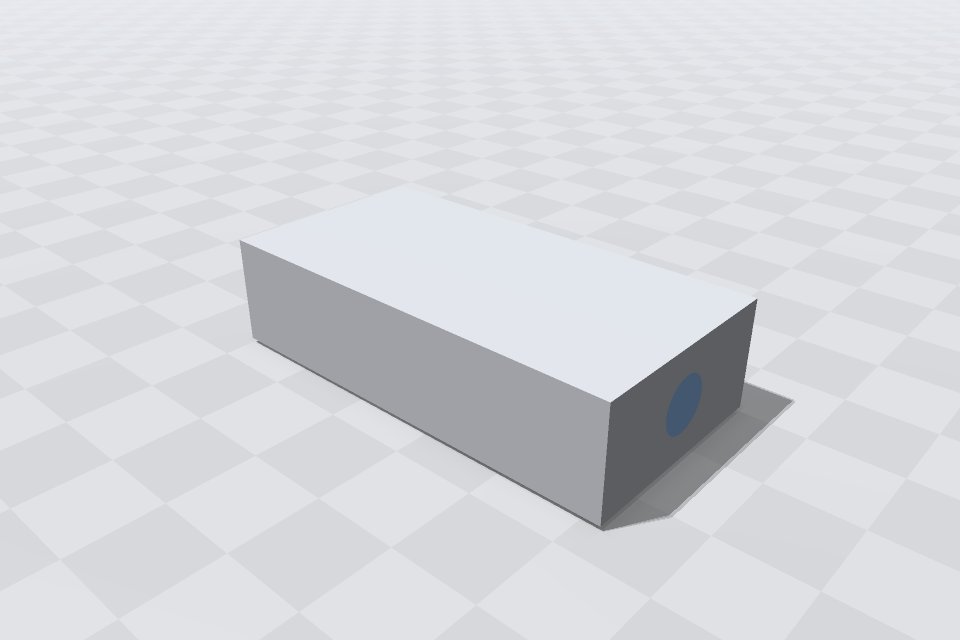
Fig. 21 The finished model, as ebgstudio Models/cooling_block/setup.ebg opens it: the steel block, and the water where the channel
comes out of it.
1. The block
The geometry goes in one file, mine/model.ebg: the block’s size as params (values a program or -D can change) and
the block itself, the model’s object:
ebg 0

param length    = 4
param width     = 2
param height    = 1
param r_channel = 0.25

block = box((0, 0, 0), (length, height, width))

object block
ebgstudio mine/model.ebg opens it; ebgstudio params mine/model.ebg lists the params, and ebgstudio
mine/model.ebg -D length=6 opens it longer.
2. Labeling its faces
The faces of the block will be the boundaries of the computations: the heated base, the top and the sides, the two
ends. A label names a shape’s parts (a box’s are xmin to zmax, see Shapes); a label
written on its own line keeps the shape’s line short:
block = box((0, 0, 0), (length, height, width))
  .label(ymin = "base", ymax = "top", zmin = "side", zmax = "side", xmin = "end", xmax = "end")
ebgstudio check mine/model.ebg --inventory lists the labels and which part has which:
shapes and their parts:
  box at mine/model.ebg:8:9, parts: xmin="end" xmax="end" ymin="base" ymax="top" zmin="side" zmax="side"
3. The channel, and two regions
The channel is a cylinder along the block, its caps the water’s inlet and outlet. The steel and the water are two
regions of an overlay, each with a material; where they overlap, the later one is: the water.
channel = cylinder((0, height / 2, width / 2), (length, height / 2, width / 2), r_channel)
  .label(cap1 = "inlet", cap2 = "outlet", side = "bore")

object overlay {
  region solid = block material steel
  region water = channel material water
}
The window colors the regions by material. check now warns that steel and water are not declared: that is
the setups’ job.
4. The materials
What is computed on the geometry goes in files of its own, so that one geometry can have several setups (see
The .ebg language). First the materials, shared by every setup, in mine/materials.ebg, with the properties a
program reads (any names; the language gives them no meaning):
ebg 0

material steel { conductivity = 45, density = 7850, heat_capacity = 490 }
material water { conductivity = 0.6, density = 1000, viscosity = 1.0e-3, heat_capacity = 4180 }
5. The flow: a setup and its domain
A domain is one computation: the regions it runs in (its subdomains) and what it does on each piece of surface that
bounds them (its surface groups). The flow is a setup of its own, mine/flow.ebg, which names the geometry and the
materials it needs. The flow runs in the water, enters at the inlet and leaves at the outlet:
ebg 0

include("model.ebg")
include("materials.ebg")

param inflow = 0.5

domain flow {
  subdomain fluid = water
  group inlet = label("inlet") { velocity = (inflow, 0, 0), temperature = 290 }
  group outlet = label("outlet") { pressure = 0 }
}
ebgstudio check mine/flow.ebg --domain flow says whether every piece of surface around the water is in a surface
group. One is not, and the check names it by the shape it comes from and the regions on its two sides:
mine/flow.ebg:8:8: error: the cylinder at mine/model.ebg:11 between 'water' and 'solid' is in no surface group of domain 'flow'
domain 'flow': incomplete
The channel’s wall, where the water meets the steel, needs a condition: the water sticks to it. Add a group to the domain:
group wall = interface(water, solid) { kind = "no_slip" }
and the check reports the domain complete. Instead of writing the group, it can be made in the window (see
The window): open ebgstudio mine/flow.ebg, click the domain flow, start a surface group, click the
channel’s wall and press Enter; the window writes the group into flow.ebg, the file that holds the domain. Its
panel counts the pieces still in no group, and [Next unassigned] turns the camera to each.
6. The heat: a second setup
The heat runs in the steel: heated through the base, cooled through the channel, insulated elsewhere. Its setup,
mine/heat.ebg, names the same geometry and materials; remaining() takes every surface no earlier group holds:
ebg 0

include("model.ebg")
include("materials.ebg")

domain heat {
  subdomain metal = solid
  group heated = label("base") { heat_flux = 5.0e4 }
  group cooled = interface(solid, water) { kind = "coupled" }
  group insulated = remaining() { heat_flux = 0 }
}
7. Joining them
The heat crosses the channel’s wall from one computation into the other. A third setup, mine/setup.ebg, includes the
two (the geometry and the materials both include are read once), and a coupling joins the two surface groups that hold
the wall; check makes sure they hold the same surfaces:
ebg 0

include("flow.ebg")
include("heat.ebg")

couple wall_heat = surface(heat.cooled, flow.wall) { transfer = "heat" }
8. The view, and the check
Last, in mine/setup.ebg, the camera and colors the window opens with:
view { camera = (6.5, 4, 6), target = (2, 0.5, 1), color.steel = (0.6, 0.62, 0.66), color.water = (0.3, 0.55, 0.9) }
ebgstudio check mine/setup.ebg --all-domains now reports no error and no warning, and both domains complete: the
model Studio/Models/cooling_block is, and a program reads setup.ebg (or either setup on its own) with
Language::read() (see Language domains).