Value operations
Offset, Annular, Blur and Mollify change an object’s value rather than where it is. The
source is at Examples/ValueOperations/main.cpp.
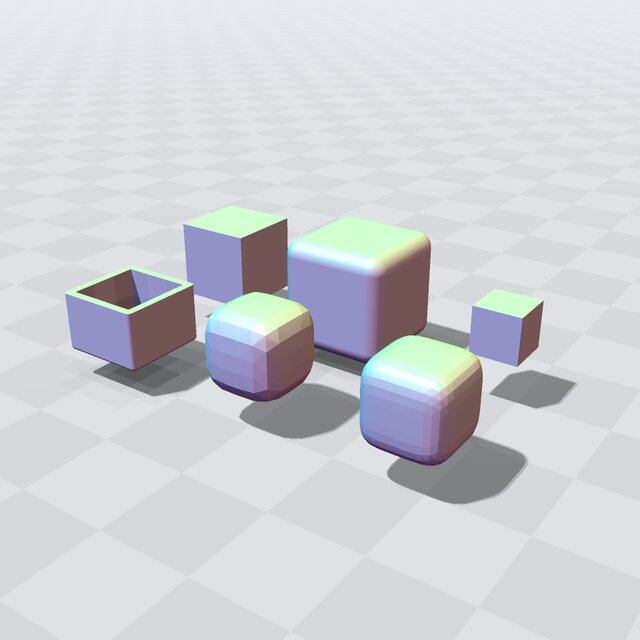
Fig. 22 The cube, offset outward and inward (back row); the open shell, blurred, mollified (front row).
The operations
Each is applied to a cube:
Offset(e, r)moves the surface outward by \(r\), inward if \(r\) is negative. Growing an exact distance keeps it exact, which rounds the cube’s edges; shrinking it gives a bound.Annular(e, d)keeps a shell of half-thickness \(d\) around the surface. The program cuts the shell’s top off with aDifferenceso that its wall shows.Blur(e, d)averages the value over 27 points spaced \(d\) apart, andMollify(e, r, n)over an \(n \times n \times n\) grid of half-width \(r\) with a smooth weight, at \(n^3\) evaluations per point. Both round edges and corners; their surfaces are averages of a few samples, which the shading shows as faint facets.
The program prints each object’s value at the cube’s corner and whether it is still an exact distance.
Looking at it
The viewer shows the six objects in two rows: the cube, grown and shrunk, then the open shell, blurred and mollified.
The window needs SDL2 and is built with make VIEWER=SDL2 or cmake -DEBGEOMETRY_VIEWER=SDL2 (see
The viewer window (EBGEOMETRY_VIEWER)); otherwise, and with --no-view or without a display, view() prints why
and returns. Drag to orbit and scroll to zoom; the window lists its other keys (see
The viewer’s keys).
Building and running
See Building for how to compile it with CMake, GNU Make, or a direct compiler invocation. Built for a GPU (see Running on a GPU), the window renders on the device.
cd Examples/ValueOperations
./ValueOperations.ex