Rendering
A signed distance function can be looked at directly, without first turning it into a mesh: follow a ray from the eye through each pixel to where it first meets the surface, and shade that point. That is a ray query (see Rays and segments): exact for the shapes and compositions that have one, sphere traced for the rest, so the renderer works on every shape and is as exact as its ray queries are.
Entering and leaving
The first crossing along a ray may be where it enters the solid or where it leaves it: a ray that starts inside the object (where \(S < 0\)) first meets the surface on its way out. A ray query reports the first crossing either way, and says which it is. This matters for what a picture shows. A hole (the complement of a ball, say) is solid everywhere but in the ball, so a camera outside the ball sits inside the solid, and what it sees first is where its rays leave the solid on the ball’s near side. A mesh whose faces are wound the wrong way is, to the signed distance, inside out, and looks like that too.
The renderer therefore lights a surface seen from inside from the eye’s side and tints it red, and reports how many such hits there were and whether the eye itself is in the solid. An inside-out object cannot then pass for an outside.
Section planes
To look inside an object, the renderer can cut it with a plane, removing everything on the side the plane’s normal \(\mathbf{n}\) points to: the intersection of the object with a half-space. The cut is exact, whatever the object: where the plane passes through the object, the picture shows a cut face lying on the plane. The face is partly transparent (by default; its opacity is a setting): the object’s next surface behind it (a hole, a cavity, the far wall) shows through, lit without shadows, which inside the object would be everywhere.
The plane also shows where it slices the object. Where a ray meets the plane before anything else, the object’s value there says where the point lies: near zero, it is on the object’s outline in the plane, drawn as a line of constant width on screen; outside, a faint sheet marks the plane, within the object’s box. So a slice shows both the object’s cross-section and, in front of the cut, the rest of its outline. The removed side can also be drawn translucent (“ghosted”) in front of the cut, so that the section is seen in place, within the whole object. Lines of equal distance can be drawn as well, inside and outside: spaced like a simulation’s grid, they show which features the grid resolves. Reversing the plane’s normal removes the other side.
What a pixel shows
For a pixel, the renderer casts one ray (or \(n \times n\) rays, averaged, which also softens the edges of shadows) and, where it meets the surface, combines diffuse and specular light from one direction, a weaker fill light from the other side (which keeps the sides the light does not reach from going dark), light from the sky, a shadow and ambient occlusion. Bright surfaces roll off towards white rather than clipping at it. The light’s direction is by default fixed to the camera, above and beside it, so that the side in view is lit wherever the camera goes; it can instead be fixed in the scene. A floor under the shape catches its shadow. Surfaces can be colored by the direction of their normal (the default), uniformly, by primitive (by the leaf of a composed expression the surface belongs to, or by the face of a mesh, with colors chosen per primitive or from a palette).
The camera looks either in perspective, every ray leaving the eye, or orthographically, the rays parallel and leaving a plane through the eye, so that sizes do not shrink with distance; a near clip starts every ray some way from the eye, so that whatever is nearer is not seen.
Shadows and ambient occlusion are ray queries on the shape too, like the ray from the eye, so each costs further rays wherever a pixel’s ray meets the surface: turning them off (as the viewer does while the camera moves) makes a frame much quicker.
Other views
Besides the shaded picture, the renderer has views that show what shading hides:
Depth colors each pixel by how far from the eye the first surface is, from bright (near) to dark (far) across the shape’s box. It needs only the crossing point, not the normal.
X-ray shows every surface a ray crosses, all the way through the scene, on a black background: each glows faintly, more where it is seen edge-on, with modest highlights from the light, and partly hides what lies behind it, so cavities, internal walls and parts hidden behind others show through as outlines.
Cost colors each pixel by what the query for one ray through its center cost, from dark (cheap) to bright (expensive), on a log scale over the frame. There are two: the cost of finding the first hit with its normal and primitive, and the cost of finding only where the ray crosses the surface (see Rays and segments); comparing them shows where a shape spends its time on the normal. Only the camera’s rays are measured, without shadows or lighting. The costs are measured as the picture is made, so they include whatever else the machine was doing: they show where a shape is expensive, and are no benchmark (see Performance testing for measuring).
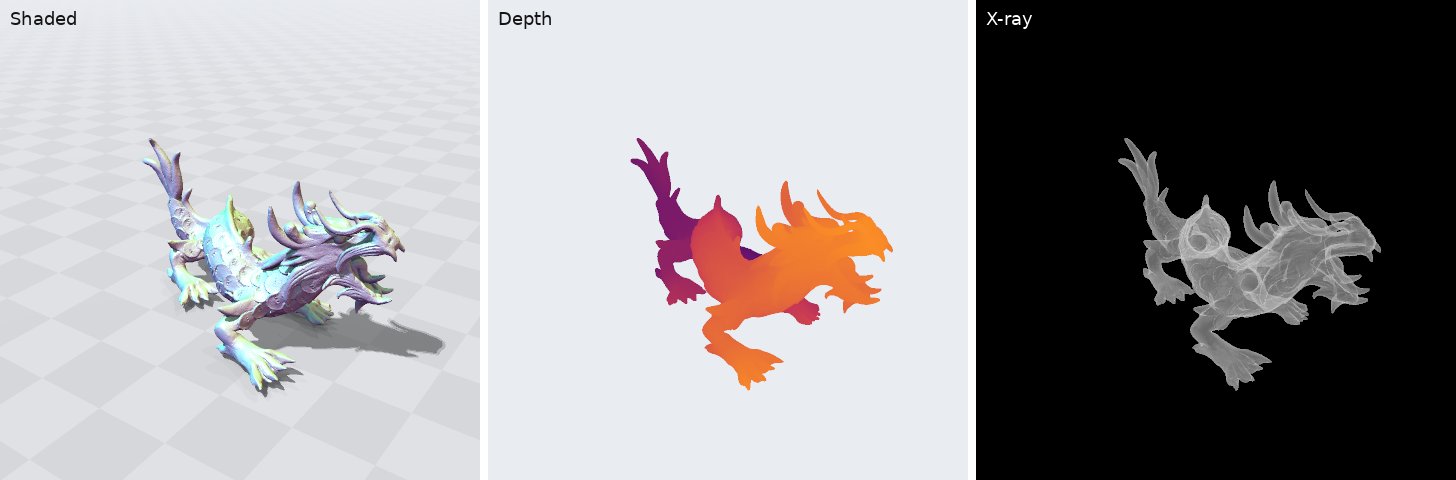
Fig. 13 A mesh in the shaded view, the depth view and the x-ray view.
Any surface can also be made see-through: a camera ray that meets it goes on as if it were not there, and the surface behind it is drawn as if seen from outside. Only the picture changes: shadows, ambient occlusion and what is inside the solid are those of the whole shape. And a part’s inside can be filled with a translucent color, wherever it lies along a ray, in front of or behind what is seen: an electrode inside a dielectric, say. A stretch of a ray inside the solid counts as the part’s when the ray enters it through that part’s surface, so where parts of a union overlap, the overlap counts as the part the ray entered first.
Regions and the window
An object made of regions (see Regions, materials and domains) is drawn as one shape, its outer surface. A view of regions draws its regions instead: the surfaces between them, colored by region, material, label or surface group, with any region hidden or seen through, and a section plane filled by each point’s material.
The renderer also has an interactive window, which renders while the camera moves and refines when it rests, picks the part under a click, and, for a view of regions, shows the domains and edits their surface groups (see The viewer).
The renderer describes the classes, and MeshSDF opens the viewer on a mesh.