CSG with a mesh
A triangle mesh is a shape like any other, so the expression builder scales and moves it and joins it to
analytic shapes. Here the xyzrgb dragon stands on a table, blended into it by a smooth union. The source
is at Examples/MeshCSG/main.cpp.
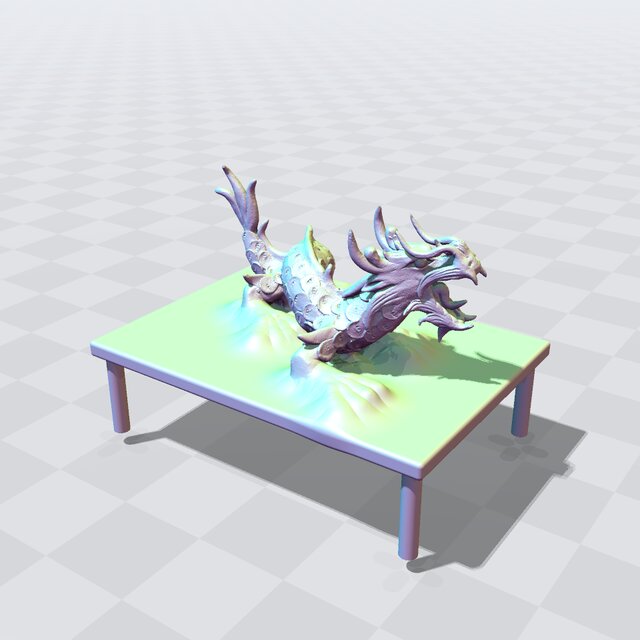
Fig. 25 The xyzrgb dragon blended into a table by a smooth union.
Important
The default mesh comes from the common-3d-test-models git submodule. Clone with
--recurse-submodules, or run git submodule update --init in the repository (see
Obtaining EBGeometry); otherwise pass a mesh of your own as the first argument.
Placing the mesh
The mesh is read into a TriMeshSDF (with Parser::OnDefect::Warn, which loads a mesh with small
defects with a warning; see Reading data), scaled to 2.4 along its longest side and stood on
\(y = 0\) with Scale and Translate. The table is a RoundedBoxSDF top on four
CylinderSDF legs.
Joining it to the table
A plain Union meets the table at a sharp edge; SmoothUnion fills a fillet of about the blend
length where the feet touch it (see Smooth CSG):
const Tape<T> smooth(pool, SmoothUnion(dragon, Union(table), T(0.3)));
The program prints both unions’ values at a few points: lower for the smooth union just above the table under the dragon, the same far from it.
Looking at it
The example ends with Render::view(smooth, pool, argc, argv), a window on the dragon and the table.
The window needs SDL2 and is built with make VIEWER=SDL2 or cmake -DEBGEOMETRY_VIEWER=SDL2 (see
The viewer window (EBGEOMETRY_VIEWER)); otherwise, and with --no-view or without a display, view() prints why
and returns. Drag to orbit and scroll to zoom; the window lists its other keys (see
The viewer’s keys).
Building and running
See Building for how to compile it with CMake, GNU Make, or a direct compiler invocation. Built for a GPU (see Running on a GPU), the window renders on the device.
cd Examples/MeshCSG
./MeshCSG.ex